
Tag: Research
40 posts tagged with "Research"
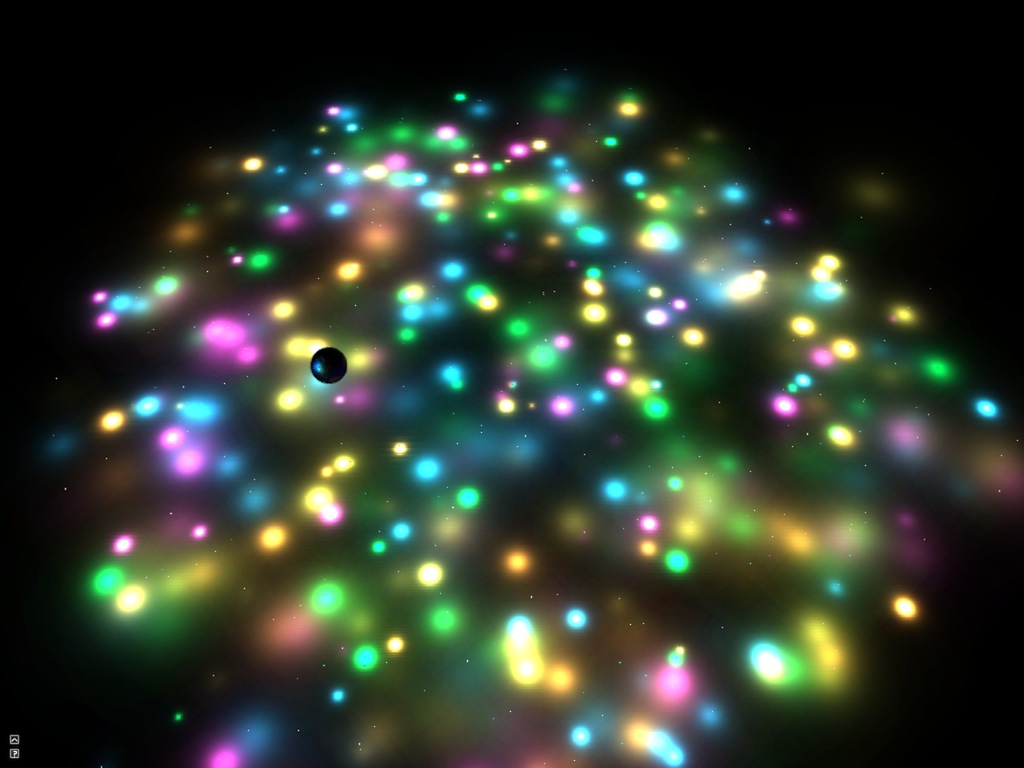
Cinder Deferred Renderer
Cinder application for deferred rendering experiments (lighing, shadow mapping, SSAO), available on Github at https://github.com/arisona/cinder_deferred_renderer
Forked from original code by Anthony Scavarelli at https://github.com/PlumCantaloupe/Cinder-Deferred-Renderer
Thanks to Anthony and the contributors this code is based on.
Original code ported to c++11 and optimized / fixed a couple of things, plus some new features/controls.
This code is based on a deferred renderer for point lights and screen space ambient occlusion (SSAO), including shadow mapping.
Digital Art Weeks at Siggraph Asia 2013
The Digital Art Weeks International will be guest at SIGGRAPH Asia this year in Hong Kong. Invited to be an exhibiting partner, the DAW has positioned itself with a ground breaking exhibition of Augmented Reality Art. The artworks can be seen through out Hong Kong on both sides of the channel.
LEA Special Issue on Live Visuals
Special issue on Live Visuals in Leonardo Electronic Almanac (LEA), edited by Özden Sahin, Lanfranco Aceti, Steve Gibson and Stefan Arisona. https://www.leoalmanac.org/vol19-no3-live-visuals/
Live Visuals, Leonardo Electronic Almanac LEA, Volume 19 Issue 3
Key advancements in real-time graphics and video processing over the past five years have resulted in broad implications for a number of academic, research and commercial communities. They enabled interaction designers, live visualists (VJs), game programmers, and information architects to utilize the power of advanced digital technologies to model, render and effect visual information in real-time.
Real-time visuals have a profoundly different quality and therefore distinct requirements from linear visual forms such as narrative film. The use of visual elements in a live or non-linear context requires a consideration of insights and techniques from other “non-visual” practices such as music performance or human-computer interaction. The issue is organised under the general rubric of knowledge-sharing between disparate research bodies and disciplines. This allows for distinct and dispersed groups to come together in order to exchange information and techniques. A key concern is to bring a humanistic approach by considering the wider cultural context of these new developments.
The special issue explores the future of the moving image, simultaneously acknowledging and extending on recent artistic trends and technological developments.
The issue is co-edited by Özden Sahin,Lanfranco Aceti, Steve Gibson, Stefan Arisona.
Table of Contents
When Moving Images Become Alive! Introduction by Lanfranco Aceti
Revisiting Cinema: Exploring The Exhibitive Merits Of Cinema From Nickelodeon Theatre To Immersive Arenas Of Tomorrow by Brian Herczog
The Future Of Cinema: Finding New Meaning Through Live Interaction by Dominic Smith
A Flexible Approach For Synchronizing Video With Live Music by Don Ritter
Avatar Actors by Elif Ayiter
Multi-Projection Films, Almost-Cinemas And Vj Remixes: Spatial Arrangements Of Moving Image Presence by Gabriel Menotti
Machines Of The Audiovisual: The Development Of “Synthetic Audiovisual Interfaces” In The Avant-Garde Art Since The 1970s by Jihoon Kim
New Photography: A Perverse Confusion Between The Live And The Real by Kirk Woolford
Text-Mode And The Live Petscii Animations Of Raquel Meyers: Finding New Meaning Through Live Interaction by Leonard J. Paul
Outsourcing The VJ: Collaborative Visuals Using The Audience’s Smartphones by Tyler Freeman
AVVX: A Vector Graphics Tool For Audiovisual Performances by Nuno N. Correia
Architectural Projections: Changing The Perception Of Architecture With Light by Lukas Treyer, Stefan Arisona & Gerhard Schmitt
In Darwin’s Garden: Temporality and Sense of Place by Vince Dziekan, Chris Meigh-Andrews, Rowan Blaik & Alan Summers
Back To The Cross-Modal Object: A Look Back At Early Audiovisual Performance Through The Lens Of Objecthood by Atau Tanaka
Structured Spontaneity: Responsive Art Meets Classical Music In A Collaborative Performance Of Antonio Vivaldi’s Four Seasons by Yana (Ioanna) Sakellion & Yan Da
Interactive Animation Techniques In The Generation And Documentation Of Systems Art by Paul Goodfellow
Simulating Synesthesia In Spatially-Based Real-Time Audio-Visual Performance by Steve Gibson
A ‘Real Time Image Conductor’ Or A Kind Of Cinema?: Towards Live Visual Effects by Peter Richardson
Live Audio-Visual Art + First Nations Culture by Jackson 2bears
Of Minimal Materialities And Maximal Amplitudes: A Provisional Manual Of Stroboscopic Noise Performance by Jamie Allen
Visualization Technologies For Music, Dance, and Staging In Operas by Guerino Mazzola, David Walsh, Lauren Butler, Aleksey Polukeyev
How An Audio-Visual Instrument Can Foster The Sonic Experience by Adriana Sa
Gathering Audience Feedback On An Audiovisual Performance by Léon McCarthy
Choreotopology: Complex Space In Choreography With Real-Time Video by Kate Sicchio
Cinematics and Narratives: Movie Authoring & Design Focused Interaction by Mark Chavez & Yun-Ke Chang
Improvising Synesthesia: Comprovisation Of Generative Graphics And Music by Joshua B. Mailman
Title: Live Visuals
Editor: Özden Sahin
Volume Editors: Lanfranco Aceti, Steve Gibson, Stefan Arisona
Journal: Leonardo Electronic Almanac
Publisher: MIT Press
Year: 2013
Volume: 19(3)
Pages: 384
ISBN: 978-1-906897-22-2
ISSN: 1071-4391
Link: https://www.leoalmanac.org/vol19-no3-live-visuals/
Multi-Projector-Mapper (MPM): Open-Source 3D Projection Mapping Software Framework
1 Introduction
The multi-projector-mapper (MPM) is an open-source software framework for 3D projection mapping using multiple projectors. It contains a basic rendering infrastructure, and interactive tools for projector calibration. For calibration, the method given in Oliver Bimber and Ramesh Raskar’s book Spatial Augmented Reality, Appendix A, is used.
The framework is the outcome of the “Projections of Reality” cluster at smartgeometry 2013, and is to be seen as a prototype that can be used for developing specialized projection mapping applications. Alternatively, the projector calibration method alone could also be used just to output the OpenGL projection and modelview matrices, which then can be used by other applications. In addition, the more generic code within the framework might as well serve as a starting point for those who want to dive into ‘pure’ Java / OpenGL coding (e.g. when coming from Processing).
Currently, at ETH Zurich’s Future Cities Laboratory we continue to work on the code. Among upcoming features will be the integration of the 3D scene analysis component, that was so far realised by a separate application. Your suggestions and feedback are welcome!
1 Source Code Repository @ GitHub
The framework is available as open-source (BSD licensed). Jump to GitHub to get the source code:
https://github.com/arisona/mpm
The repository contains an Eclipse project, including dependencies such as JOGL etc. Thus the code should run out of the box on Mac OS X, Windows and Linux.
2 Usage
The framework allows an arbitrary number of projectors - as many as your computer allows. At smartgeometry, we were using an AMD HD 7870 Eyefinity 6 with 6 mini-displayport outputs, where four outputs were used for projection mapping and one as control output:
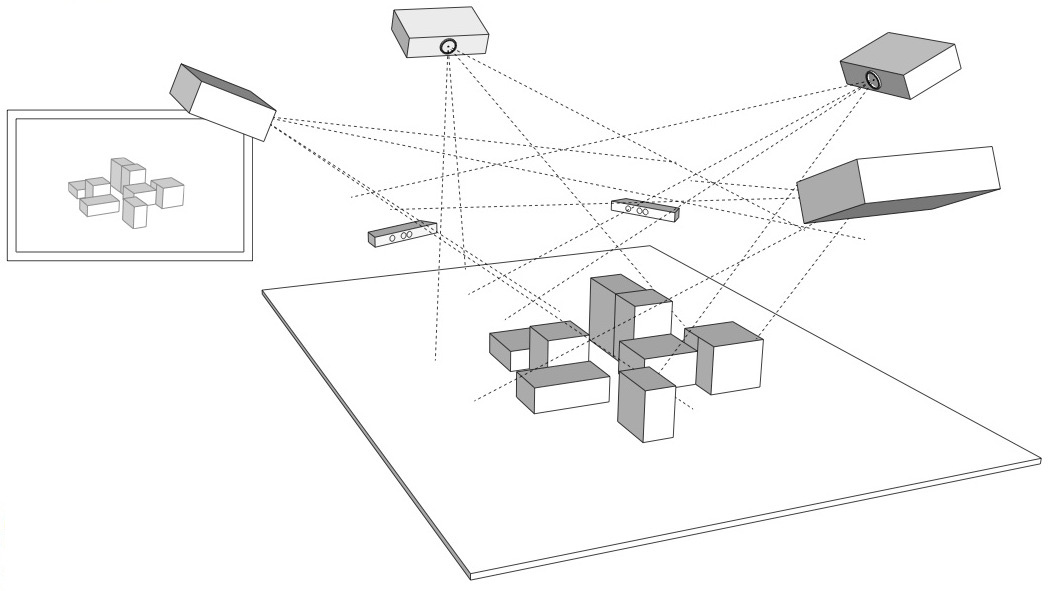
2.1 Configuration
The code allows opening an OpenGL window for every output (for projection mapped scenes, windows without decorations are used, and they can be placed accordingly at full screen on the virtual desktop):
public MPM() {
  ICalibrationModel model = new SampleCalibrationModel();
  scene = new Scene();
  scene.setModel(model);
  scene.addView(new View(scene, 0, 10, 512, 512, "View 0", 0, 0.0, View.ViewType.CONTROL_VIEW));
  scene.addView(new View(scene, 530, 0, 512, 512, "View 1", 1, 0.0, View.ViewType.PROJECTION_VIEW));
  scene.addView(new View(scene, 530, 530, 512, 512, "View 2", 2, 90.0, View.ViewType.PROJECTION_VIEW));
  ...
}
Above code opens three windows: one control view (which contains window decorations), and two projection views (without decorations). The coordinates and window sizes in this example are just samples and need to be adjusted for a concrete case (i.e. depending on virtual desktop configuration).
2.2 Launching the Application & Calibration
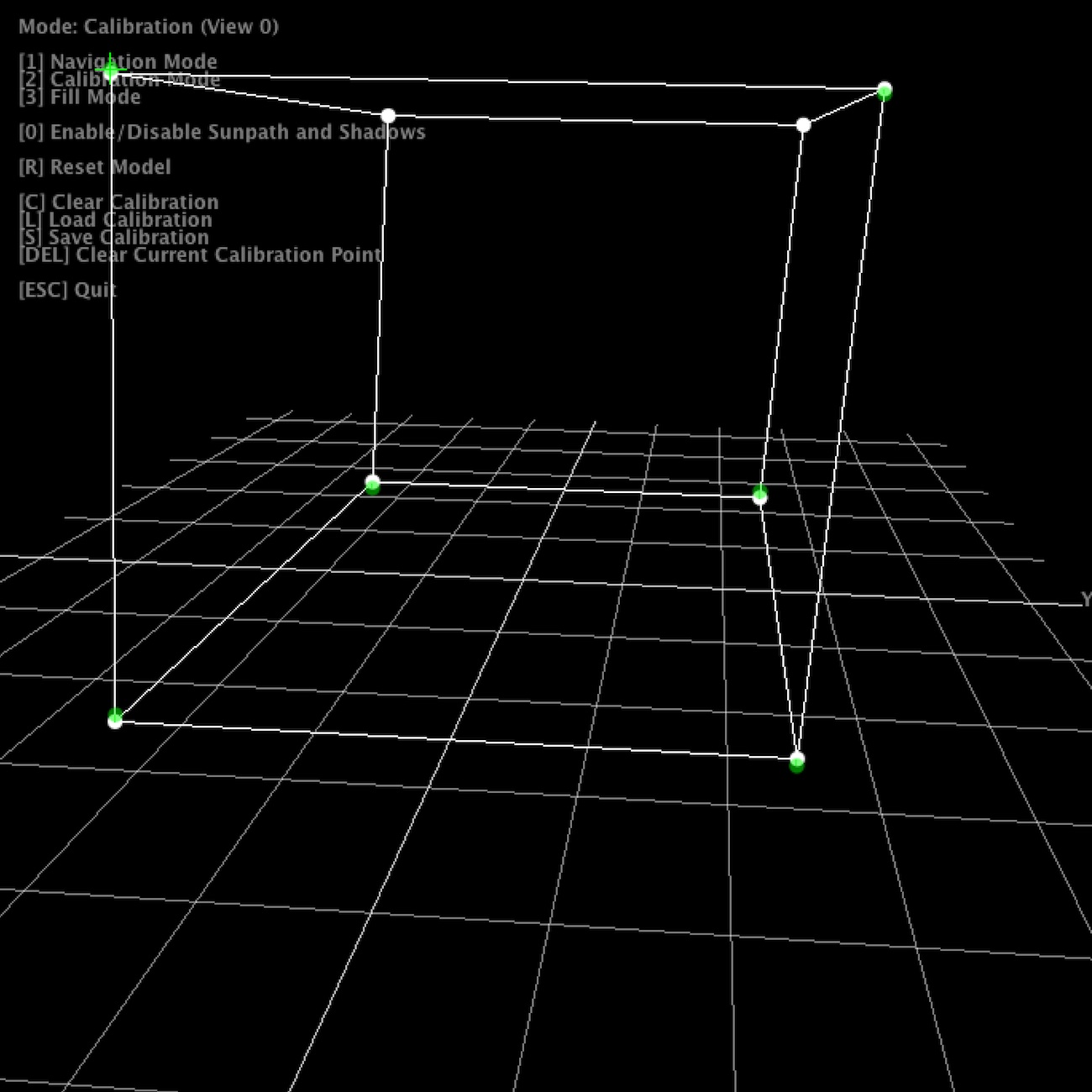
Once the application launches, all views show the default scene. The control view in addition shows the available key strokes. Pressing “2” switches to calibration mode. The views will now show the calibration model, with calibration points. Note that in calibration mode, all projection views will blank, unless their window is activated (i.e. by clicking into the window).
For calibration, 6 circular calibration points in 3D space need to be matched to the their physical counterparts. Thus, when using the default calibration model, which is a cube, a physical calibration rig corresponding to the cube needs to be used:
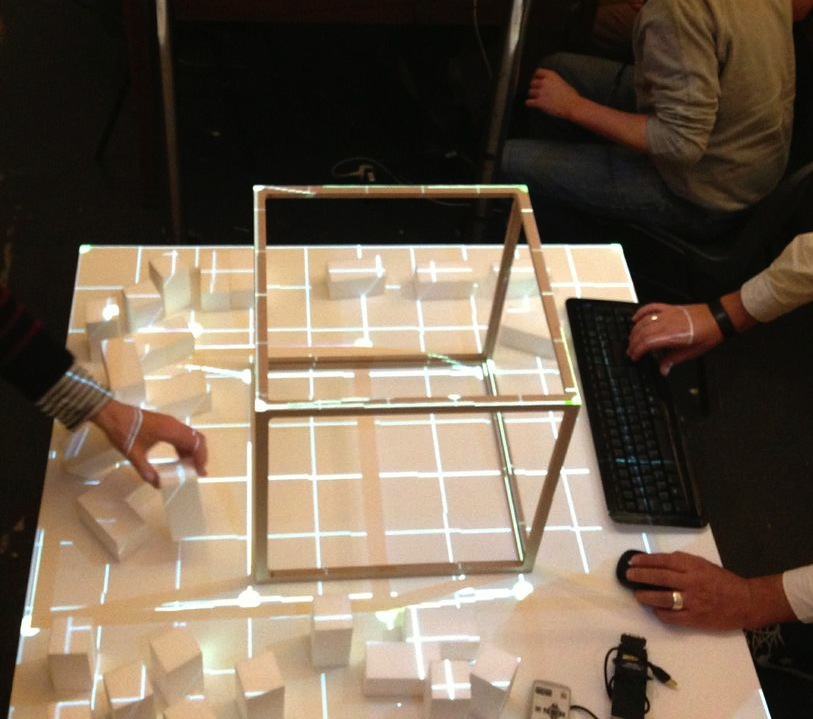
The individual points can now be matched by dragging them with the mouse. For fine tuning, use the cursor keys. As soon as the 6th point is selected, the scene automatically adjusts.
For first time setup, there is also a ‘fill mode’ which basically projects a white filled rectangle (with a cross hair in the middle) for each projector. This allows for easy rough adjustment of each project. Hit “3” to activate fill mode.
Once calibration is complete, press “S” to save the configuration, and “1” to return to navigation / rendering mode. On the next restart, press “L” to load the previous configuration. When in rendering mode, the actual model is shown, which by default is just a fake model, thus a piece of code that is application specific. The renderer includes shadow volume rendering (press “0” to toggle shadows), however the code is not optimised at this point.
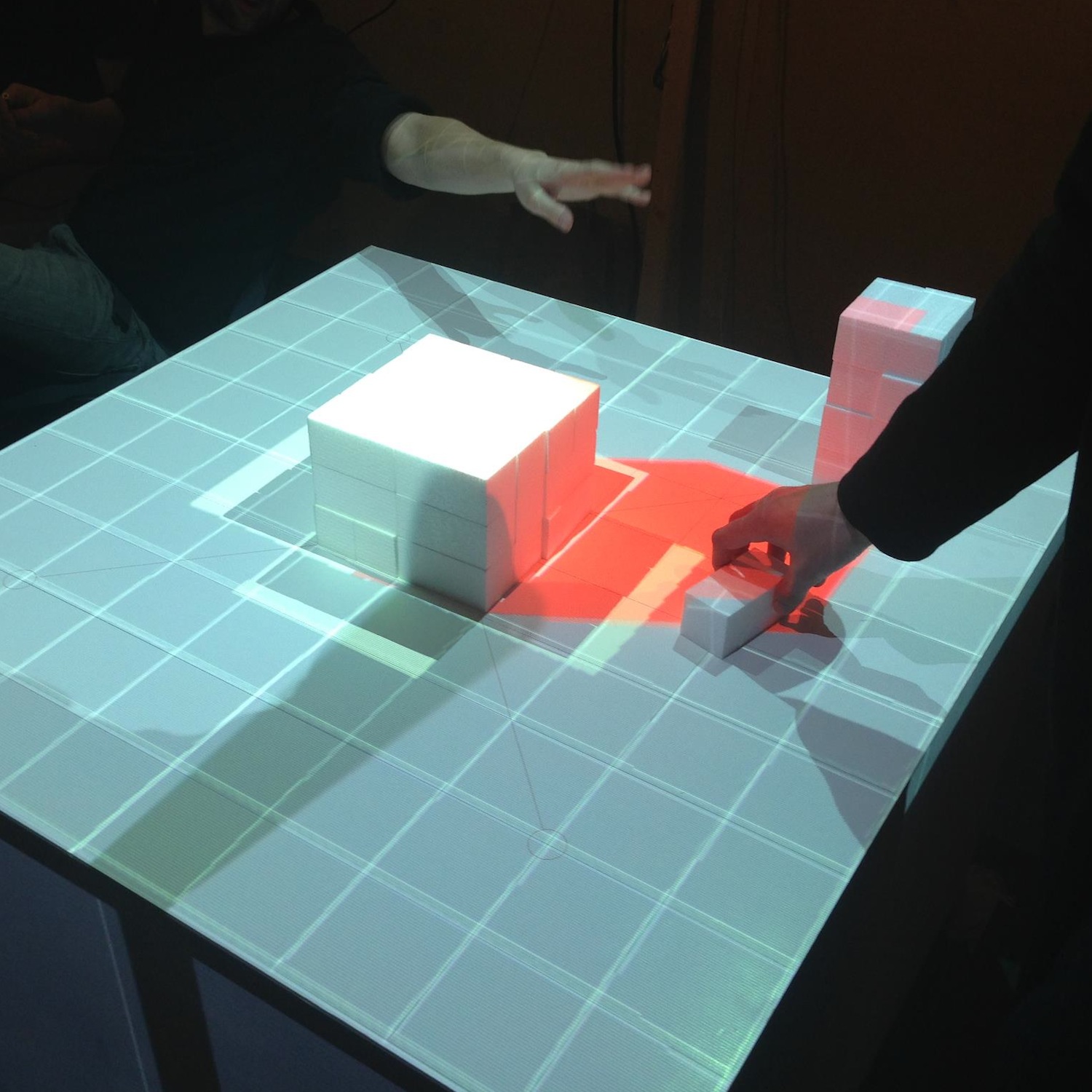
Note that it is not necessary to use a cube as calibration rig - basically any 3D shape can be used for calibration, as long as you have a matching 3D and physical model. Simply replace the initialisation of your ICalibrationModel with an instance of your custom model.
The following YouTube video provides a short overview of the calibration and projection procedure:
3 Code Internals and Additional Features
The code is written in Java using the JOGL OpenGL bindings for rendering, and the Apache Commons Math3 Library for the matrix decomposition. Most of the it is rather straightforward, as it is intentionally kept clean and modular. Rendering to multiple windows makes use of OpenGL shared contexts. Currently, we’re working on the transition towards OpenGL 3.2 and will replace the fixed pipeline code.
In addition, the code also contains a simple geometry server, basically listening via UDP or UDP/OSC for lists of coloured triangles, which are then fed into the renderer. Using this mechanism, at smartgeometry, we build a system consisting of multiple machines doing 3D scanning, geometry analysis and rendering, by sending geometry data between them using the network. Note that this is prototype code and will be replaced with a more systematic approach in future.
4 Credits & Further Information
Concept & projection setup: Eva Friedrich & Stefan Arisona. Partially also based on earlier discussions and work of Christian Schneider & Stefan Arisona.
Code: MPM was written by Stefan Arisona, with contributions by Eva Friedrich (early prototyping, and shadow volumes) and Simon Schubiger (OSC).
Support: This software was developed in part at ETH Zurich’s Future Cities Laboratory in Singapore.
A general overview of the work at smartgeometry'13 is available at the “Projections of Reality” page.
Visualizing Interchange Patterns in Massive Movement Data (EuroVis 2013)
Authors: Wei Zeng, Chi-Wing Fu, Stefan Arisona, Huamin Qu
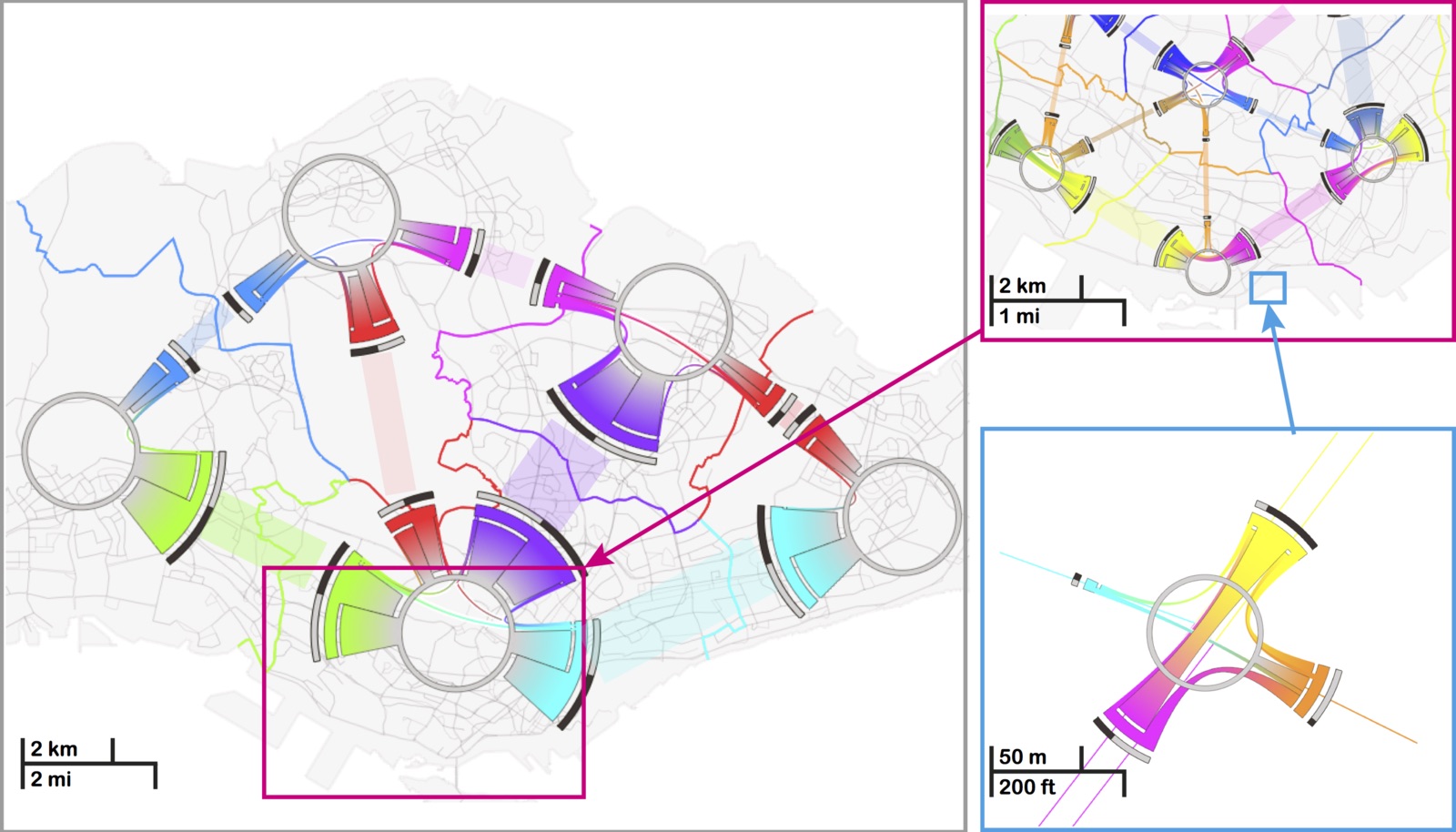
Abstract: Massive amount of movement data, such as daily trips made by millions of passengers in a city, are widely avail- able nowadays. They are a highly valuable means not only for unveiling human mobility patterns, but also for assisting transportation planning, in particular for metropolises around the world. In this paper, we focus on a novel aspect of visualizing and analyzing massive movement data, i.e., the interchange pattern, aiming at re- vealing passenger redistribution in a traffic network. We first formulate a new model of circos figure, namely the interchange circos diagram, to present interchange patterns at a junction node in a bundled fashion, and optimize the color assignments to respect the connections within and between junction nodes. Based on this, we develop a family of visual analysis techniques to help users interactively study interchange patterns in a spatiotemporal manner: 1) multi-spatial scales: from network junctions such as train stations to people flow across and between larger spatial areas; and 2) temporal changes of patterns from different times of the day. Our techniques have been applied to real movement data consisting of hundred thousands of trips, and we present also two case studies on how transportation experts worked with our interface.
https://www.youtube.com/watch?v=_QWnA1k2ZrU
Title: Visualizing Interchange Patterns in Massive Movement Data
Authors: Wei Zeng, Chi-Wing Fu, Stefan Arisona, Huamin Qu
Journal: Computer Graphics Forum
Publisher: Wiley
Year: 2013
Volume: 32(3)
Pages: 271-280
DOI: 10.1111/cgf.12114
Link: https://onlinelibrary.wiley.com/doi/10.1111/cgf.12114/abstract